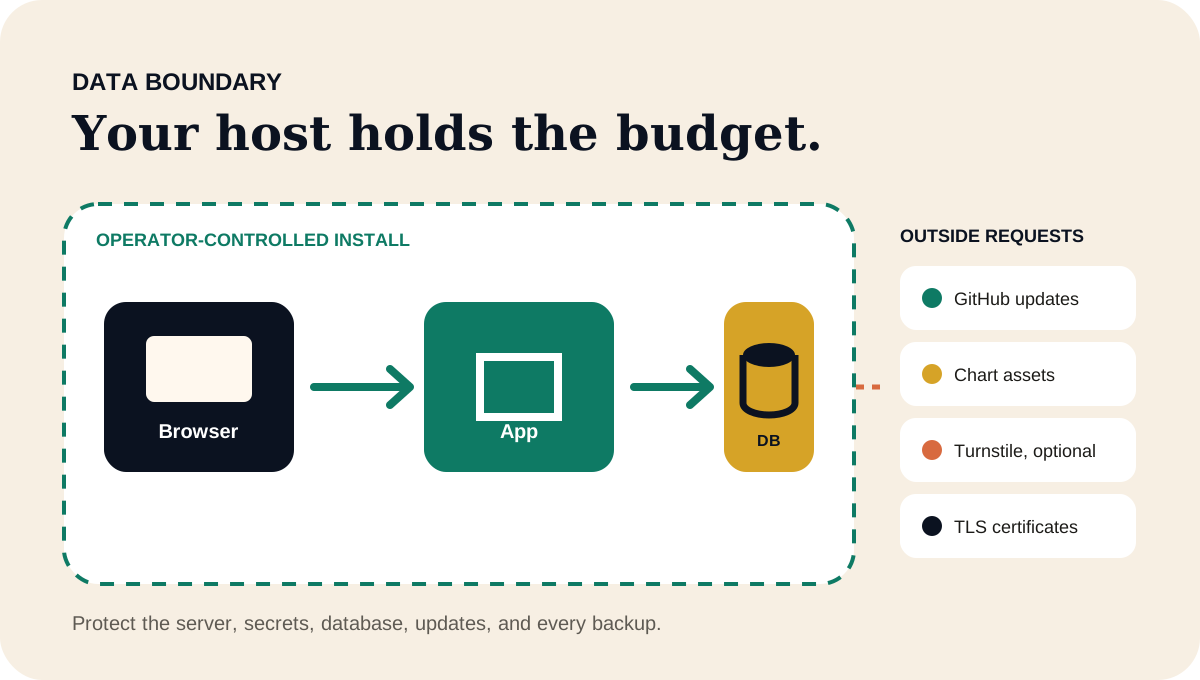
Know exactly what the app protects—and what remains your job.
Your budget lives in the PostgreSQL database you operate. Optional SimpleFIN connections use an app-specific access token encrypted on your server; bank sign-in happens at SimpleFIN. Protect the host, access, updates, and backups.
Your installation holds your budget. Review the few features that may contact outside services.
Data boundary
Your installation holds the financial records.
Stored in the database you run
Your sign-in and app preferences.
Monthly plans, recurring items, categories, and month-end totals.
Transactions, account balances, imported files, and matching history.
Short-lived import and Backup v2 staging data, generated exports, and recovery copies.
Security and change history needed to explain important actions.
Not stored in a FinanceTracking.app cloud account
FinanceTracking.app does not offer a hosted budgeting account.
Bank connections are optional and use your own SimpleFIN subscription.
The project does not receive your self-hosted database or exported backups.
Server logs and off-site backups stay with the hosting providers you choose.
Important distinctionThe public marketing website uses Google Analytics. That website measurement is separate from a self-hosted FinanceTracking.app installation and cannot read the records in your database.
Outside services
A few features contact services outside your server.
Service
When it is used
What is shared
Can you turn it off?
SimpleFIN Bridge
Only after you connect a SimpleFIN subscription and request a refresh or enable scheduled refreshes.
An app-specific access credential and account/date filters. The server receives the balances and activity authorized in SimpleFIN; your budget plan is not uploaded.
Disconnect in Bank connections to remove the local credential and stop refreshes. Revoke the app in SimpleFIN to remove remote access.
GitHub Releases API
The app checks for a newer release and caches the result.
Request metadata, repository name, app version in the user agent, and the host's network address. No budget records are sent.
Set GITHUB_UPDATE_CHECKS_ENABLED=false to disable the check.
jsDelivr
Chart.js and Apache ECharts load in the browser on pages that render charts.
A normal browser asset request, which can include IP address, browser details, and referrer information.
Block the CDN at the network or browser level, understanding that chart surfaces may not render.
Cloudflare Turnstile
Only when you enable Turnstile to help protect sign-in.
Browser challenge and verification data handled by Cloudflare.
Leave both Turnstile settings blank to keep it disabled.
Caddy certificate services
The included public-production proxy obtains and renews trusted TLS certificates.
Domain and certificate-validation traffic required by the configured certificate authority.
Choose a different reverse proxy or the documented private-LAN certificate path.
Built-in protection
The app helps protect access, but you still need to secure the server.
Separate user and admin access
Administrators can manage users and review security history without opening private budgeting records.
Sign-in abuse limits
Repeated sign-in attempts are rate limited. You can also add Cloudflare Turnstile if that outside service fits your setup.
Safer browser defaults
Security headers limit where scripts can load from, prevent other sites from framing the app, and require secure requests outside local development.
HTTPS-ready production setup
The production setup expects HTTPS, uses secure cookies, checks allowed host names, and keeps the app and database on a private Docker network.
Checks before changes ship
Automated tests and vulnerability scans catch many common problems before release. Passing checks reduces known risk, but no scan can guarantee that software has no vulnerabilities.
Encryption and recovery
Protect both the live database and every copy made from it.
Portable app backups
Choose which parts of your budget to export, add password protection if needed, and preview what a restore would replace before applying it. Staged Backup v2 restore data and generated exports are encrypted while stored in the application database.
Unconfirmed restore previews expire after 15 minutes, generated exports after one day, and the encrypted recovery copy made before a replacement restore after seven days. These application controls do not replace database or disk encryption.
Server and database backups
Disk encryption, off-site storage, backup retention, and recovery testing depend on the server and providers you choose.
Keep database backups as well as app exports; they give you different ways to recover.
Self-hosting safety checklist
Make these choices before putting your budget online.
01
Pin the release
Choose a specific published image tag and review release notes before updating.
02
Set real secrets
Use unique Rails, database, admin, and user credentials; never commit the production environment file.
03
Limit access
Configure HTTPS, allowed hosts, registration policy, firewall rules, and host administration for the intended audience.
04
Back up two ways
Keep PostgreSQL/infrastructure backups and portable application exports in controlled locations.
05
Practice recovery
Test database recovery, app restore previews, and the temporary safety copy somewhere safe before depending on them.
06
Review outbound requests
Disable optional integrations or restrict network access when their tradeoff does not fit your environment.
Found a security problem?
Keep the report private and use made-up examples instead of real financial data. The security policy explains what to include and what never to send.