What to know before you install
Know the tradeoffs before you install.
See what FinanceTracking.app handles, what you will manage yourself, and whether it fits your routine.
Is FinanceTracking.app a hosted service?
No. You install it on a server you control and are responsible for setup, security, updates, and backups.
What license does FinanceTracking.app use?
FinanceTracking.app is source-available under the PolyForm Noncommercial License 1.0.0. It permits use, modification, and redistribution for noncommercial purposes. Commercial use requires separate written permission. Because commercial use is restricted, it is not an open-source license.
What does FinanceTracking.app require?
You need a computer or server that can run Docker, plus comfort managing secure access, updates, and backups. The setup guide lists the exact requirements.
Can a household or group use it?
One installation can have multiple signed-in users, but each regular user sees their own months and entries. It is not currently presented as a shared collaborative household budget.
Does FinanceTracking.app connect to banks automatically?
You can optionally connect a SimpleFIN subscription for read-only balances and reviewed transactions, with manual or twice-daily refreshes. Manual entry and CSV imports remain available.
What can I import from CSV?
You can import one month of spending or an account activity file. Before anything changes, the app flags invalid or duplicate rows and shows what will be added; if any row fails, nothing is imported. After you confirm an account activity import, it continues in the background and saves its progress.
Can I leave the page while an import or backup is running?
Yes, after you confirm an account activity import or a Backup v2 export or restore. The work continues in the background and saves its status so you can return later. Import and restore previews still expire after 15 minutes if you have not confirmed them.
Does FinanceTracking.app have a mobile app?
There is no native mobile app. The website adapts to phones and tablets, so you can use it in a browser.
Is FinanceTracking.app data encrypted?
The app encrypts staged Backup v2 restore data and generated exports while they are stored in its database, and you can password-protect downloaded exports. Because you host the app, you are still responsible for encrypting the server and storage, using HTTPS, limiting access, and protecting backup files.
Does self-hosting make FinanceTracking.app automatically private?
No. Privacy still depends on how you secure the server, account access, logs, and backups. The trust page lists the small set of external services the app may contact.
Where can I get support or report a security issue?
Use the support page for documentation, setup help, sanitized bug reports, and product feedback. Report suspected vulnerabilities privately according to the security policy, never in a public issue.
How do I update an existing installation?
Back up first and follow the update guide for your installed version. It checks your existing budget before changing anything and explains how to return to the previous setup if a check fails.
What backup and restore tools are included?
Backup v2 exports and restores continue in the background after confirmation. You can password-protect an export and preview what a restore would replace. Generated downloads remain available for one day, and a replacement restore keeps an encrypted safety copy for seven days. You still need regular server backups.
How is FinanceTracking.app different from a spreadsheet?
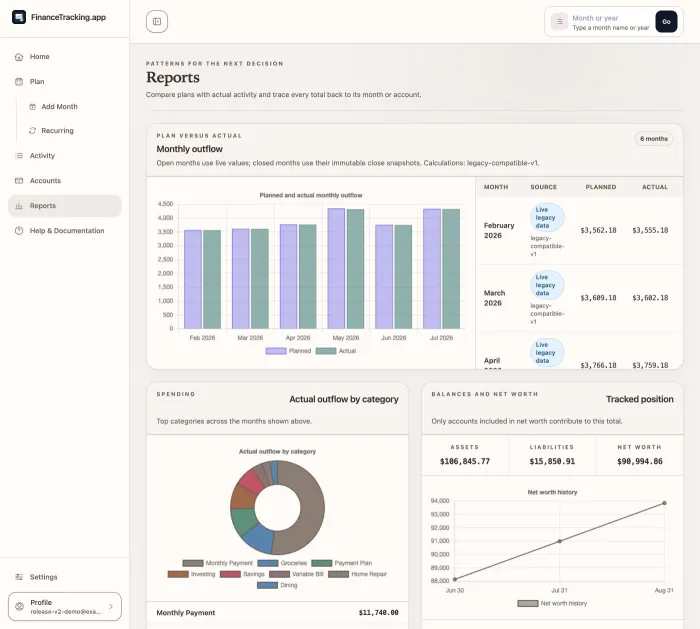
It gives you repeatable monthly planning, recurring items, transaction matching, reports you can verify, and a close-and-backup routine without building all of that yourself.
What happens when I close a month?
The app checks for unfinished work, then locks the totals and transactions you reviewed. Reopen the month before adding or correcting late activity.
Can I verify a chart without using color or hover?
Yes. Every chart includes labels, a written summary, and exact values; you can also open the transactions behind a total.
Who is FinanceTracking.app not for?
It is not a fit for people who want managed hosting, a native mobile app, investment performance analysis, or accounting, tax, legal, or financial advice.
Review self-hosting before putting your budget online.
The self-hosting guide explains setup, security, updates, and recovery in one checklist.